PeakMonsters Updates
We have recently pushed new updates on PeakMonsters to make it easier for users to lock/unlock land deeds in bulk. We have also updated the website to add support on dual element cards. Keep reading to know more details about these.

Locking Land Deeds on PeakMonsters
Security is probably the most important concern for our assets. A considered essential security feature in the Splinterlands ecosystem is being able to lock the cards that we do not plan to sell or transfer immediately.
With the most recent Splinterlands update, locking land deeds just became possible.
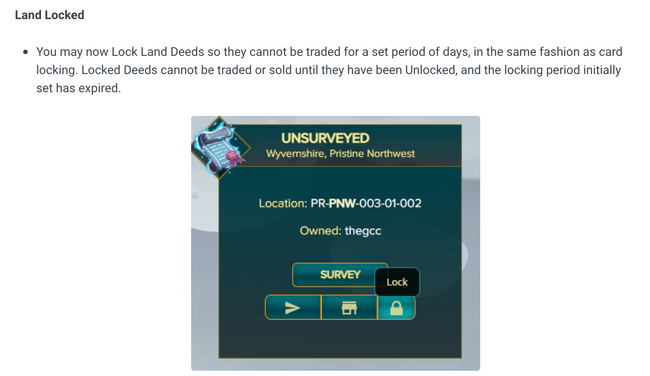
HOW TO LOCK YOUR LAND DEEDS ON PEAKMONSTERS
Locking your land deeds on PeakMonsters is easy. When locking individual deeds, you just have to click on the lock icon for the deed that you want to lock, then input the number of days needed for it to be unlocked.

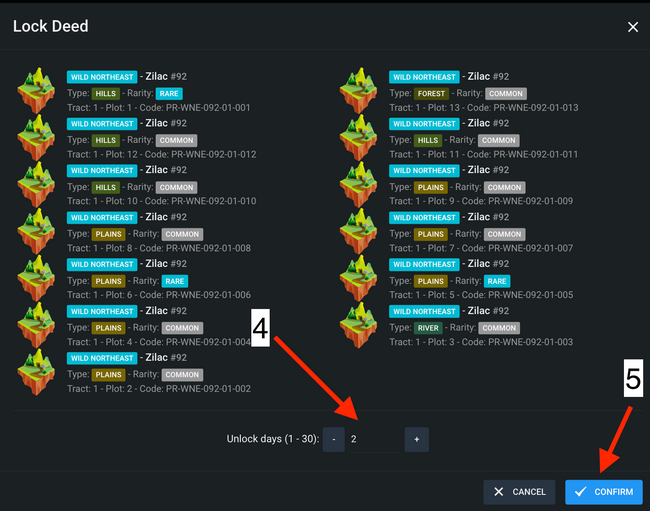
LOCKING/UNLOCKING IN BULK
Aside from the easy interface when locking deeds individually, Peakmonsters users can also lock/unlock land deeds in bulk. Here is how to do it.

STEPS:
Selectall the land deeds that you want to lock- Click on the
triangleicon at the top-right corner - Click
Lock - Input the
number of daysneeded for the land deed to be unlocked - Click
Confirm
Added support for Dual Element Cards
Splinterlands has just released the first ever dual element card, Zyriel. We have updated the website to be able to handle Zyriel and other dual element cards. This support includes card visualization and filters.

That's it! Feel free to let us know in the comments section if you suggestions or if you encounter any issue related to these updates.
PeakMonsters and Splinterlands links:
- PeakMonsters: https://peakmonsters.com/
- PeakD accounts: PeakMonsters | PeakMonsters blogging account
- PeakD Projects discord: https://discord.gg/QdYg3zUSCD
- Play Splinterlands: https://splinterlands.com?ref=peakmonsters
Other Social Media accounts: