What Will I Learn?
This tutorial covers the topics on obtaining information from the internet page by using Python.
- First of all you will learn how to Python setup for Windows briefly.
- Then, you will learn how to PyCharm which is a program to use Phyton language briefly.
- Then, you will learn how to add packages for Python by using PyCharm program.
- Then, you will learn how to import the packages briefly.
- Then, you will learn how to use for and if statements briefly.
- Then, you will learn how to obtain information from the internet page.
- Then, you will learn to get some information from Steemit member page.
Requirements
For this tutorial, you need Python 3.6.4 (actually you do not need newest version but always updating the Python is useful for you.) and PyCharm program.
- For Python 3.6.4 => you can download here for free.
- For PyCharm program => you can download here for free (30 days trial).
Difficulty
This tutorial has an indermadiate level.
Tutorial Contents
We want to build a program to make an analysis for Steemit members such as personalized tags, blog headings, wallet etc. Today, we will show how you can take information from a website by using Python.
First of we need to setup Python for Windows to use it. For this issue, below pictures are easy to understand and make setup:

Then we need to setup PyCharm program to work Python and you can download it like this:

After setup Python and PyCharm program, you need to open PyCharm program and the design will be like this and you can create files by right clicking the folder which is named untitled1 for us. Then you need to choose new and then Python file. After giving a name for file you are ready.

Now, you are ready to write your code in Python. Before starting to write the codes we need some packages which is written programmers and we can use these packages for free. We like Python due to its open source. Also you can create your packages and you can advertise it. Anyway, let's learn how to download packages. You need to choose File>Settings then there will be a pop-up menu which is related to general settings and also Project Interpreter menu. You can see the dowloaded packages and also you can add all packages here.

For our tutorial we need to dowload beautifulsoup4 and requests packages.

We want to skip some basic learnings such as math operations, strings, variables, print etc. Also we think that with a written program you can learn a program much more easier. To achieve our goal for this tutorial, we will use two important operations which are for loop and if statement. We will explain these operations also into the code.
First of all, we need import the packages which we need to use in our program.

Now, we need to find a website to get information from it. We used our Steemit homepage which is "https://steemit.com/@onderakcaalan" Lets see, what kind of info we can take from that page. To do that you can right click the page and choose Inspect, there wil be,
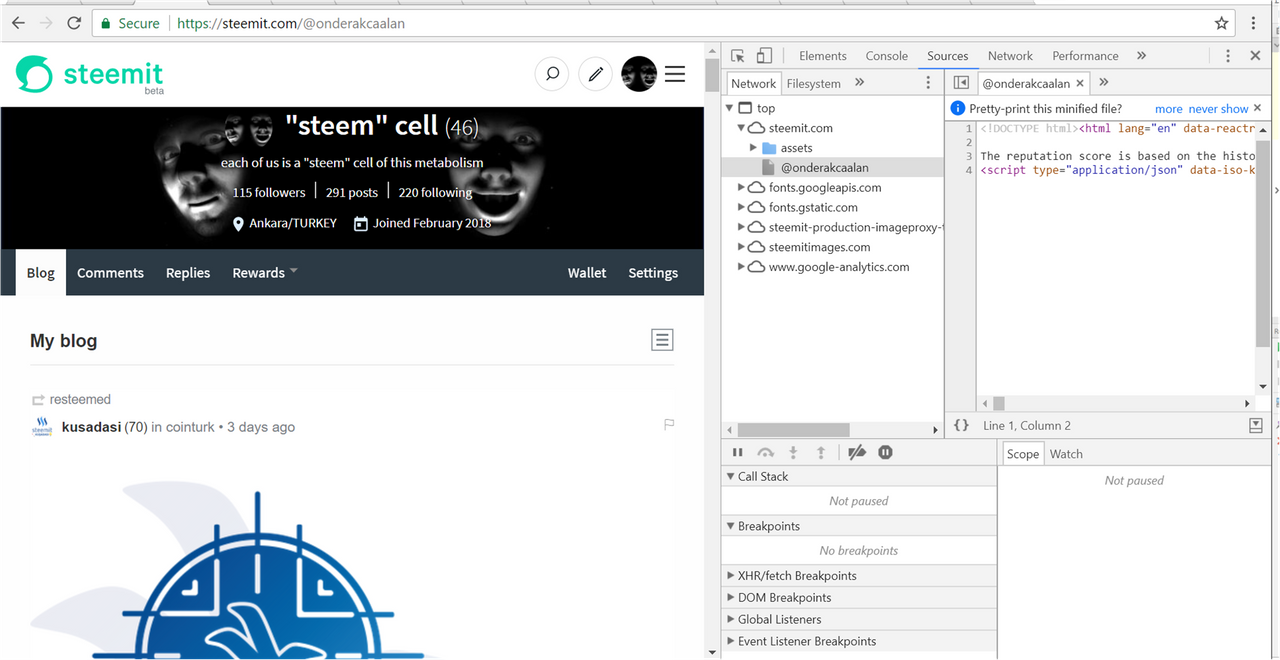
in the **Sources **tag. These are the info which you can play:D. You can download it for yourself or make an analysis from the data or what ever you want. To get these info we will use requests command. Also we want to take html part of the wabpage which contains good sources by using BeautifulSoup package command. Here is the example:

If you want to see the results you can just write print command:

You can see, we have data which contains "<a".
Now we need to show our best performance to get data. For now, we will use for loop and if statement to get data which has href which is to get info about headings and also tags which belongs that headings. To do that we need to search the dataTaken parameter and find href and save it by using .append command. Also by using if statement we are searching deeply in variables which contains "trending". Because when we check the variable data we see that after "trending" we have a valuable data which is tags. To get all data in a variable we used .append command. Also to see what the commands do we add a print command to see the results. Here,

As you see tags variable is changing in each loop and added tags in each loop
Maybe, you see that there is an another variable which is called postHeader. postHeader is used to get data which contains "href" because we will use this **postHeader **variable to get information about headings of the posts. To do that we will use another for loop but this time we used for loop in another version. For this version we will searching the variables row by row. So we need index and we are taken the index number from the size of the **postHeader ** variable. Then we are searching each row by using for loop and we are searching deeply by using if statement again to find trending word because we see that the headings are one row aside from the trending word. So we keep data aside one row such as (yy=str(postHeader[index+1]), headings.append(str(yy))) in if statement, after finding trending. Here,

As you see we have the headings. Right now, we have really easy job to clean and get exact headings. When we check the headings variables, we see that after last "/" character our wanted data which is exact heading is started in each row. Therefore we searched each data in headings variable and get the data, here.

When you start the whole code you will see this.

You can extract all data form the websites, these are just an example (This can be seen simple code but we want to show what can be done.). In the future, we will make website to see real time data flow and analysis on Steemit .
Posted on Utopian.io - Rewarding Open Source Contributors