
Source: 
What Will I Learn?
I will clearly guide you how to build scheduler based on Java application to read all of incoming files from remote directories and then, save its contents as per lines in to the related tables in our scheme. The scheduler will run periodically based on the time specified. And of course, the whole tutorial is done using Spring, the Java framework. These are the general steps that we will learn:
- MySQL Database Connection
- Java Date Object
- Run Separate Tasks with Threads
- Java I/O File
Requirements
- Any current JDK.
- MySQL Community version 5.6 or later.
Attention!

Source: https://spring.io/guides/gs/accessing-data-mysql/ - Any text editor or IDE (recommended to use IntelliJ IDEA).
- Any Browsers.
Difficulty
- Advanced
Tutorial Contents
Based on the previous tutorial, we still use:
- Scheme: Sample.
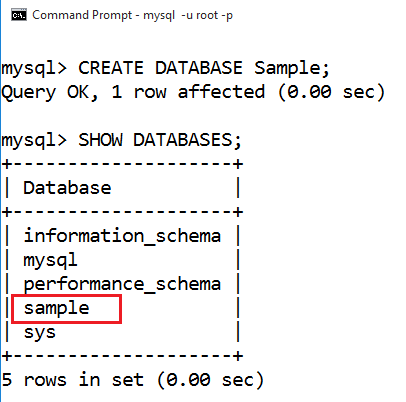
- User Access: Tester, as an account for the app to login to the scheme.

- Project: Sample.
- Dependencies are still the same too,
version '1.0-SNAPSHOT'


buildscript {
    repositories {
        mavenCentral()
    }
    dependencies {
        classpath("org.springframework.boot:spring-boot-gradle-plugin:1.5.9.RELEASE")
    }
}


apply plugin: 'java'
apply plugin: 'eclipse'
apply plugin: 'idea'
apply plugin: 'org.springframework.boot'


jar {
    baseName = 'murez-db'
    version =  '0.1.0'
}


repositories {
    mavenCentral()
}


sourceCompatibility = 1.8
targetCompatibility = 1.8


dependencies {
   /*
     * Required on JDK 9
     * compile 'javax.xml.bind:jaxb-api:2.3.0'
     */
    compile("org.springframework.boot:spring-boot-starter-web")
    compile 'org.springframework.boot:spring-boot-starter-data-jpa'
    compile 'mysql:mysql-connector-java'
    testCompile('org.springframework.boot:spring-boot-starter-test')
}
Overview
Supposed, we will receive data of the students as a plain text files with the following format:<name>|<birthday>|<score>
ExampleMurez Nasution|1990-10-23|97
Then, scheduler will start every night at 00.00 related to the current local time.
The remote directory is: D:/Test.
Any files that have been processed will be moved to the directory: D:/Test/done.
Here we go!
MySQL Database Connection
Create Entity Class
Right click on
src/main/javadirectory in the Sample project. And on pop-up dialog, type:com.murez.branch.test.entity.Product.
Next, type this code:
package com.murez.branch.test.entity;
import javax.persistence.GeneratedValue;
import javax.persistence.GenerationType;
import javax.persistence.Id;
import java.text.SimpleDateFormat;
import java.util.Date;


@javax.persistence.Entity
public class Student {
    @Id
    @GeneratedValue(strategy = GenerationType.AUTO)
    private long ID;


    private String name;
    private Date birthDay;
    private int score;


    private static final SimpleDateFormat FORMATTER = new SimpleDateFormat("yyyy-MM-dd");


    public String toString() {
        return String.format("{ 'ID': %d, 'name': '%s', 'birthDay': '%s' }", ID, name, FORMATTER.format(birthDay));
    }


    public Student setName(String name) {
        if(name != null && name.length() > 0) {
            this.name = name;
            return this;
        }
        else throw new IllegalArgumentException();
    }


    public Student setBirthday(String birthDay, String format) {
        if(birthDay != null && birthDay.length() > 0) {
            SimpleDateFormat formatter;
            if(format == null || format.length() < 1)
                formatter = FORMATTER;
            else
                formatter = new SimpleDateFormat(format);
            try {
                this.birthDay = formatter.parse(birthDay);
            } catch(Exception e) {
                try { this.birthDay = FORMATTER.parse(birthDay); }
                catch(Exception o) { }
            }
            return this;
        }
        else throw new IllegalArgumentException();
    }


    public Student setScore(int score) {
        if(score > -1) {
            this.score = score;
            return this;
        }
        else throw new IllegalArgumentException();
    }


    public Student setID(long ID) {
        this.ID = ID;
        return this;
    }


    public final Date getBirthday() { return (Date) birthDay.clone(); }


    public final String getName() { return name; }


    public final int getScore() { return score; }


    public final long getID() { return ID; }
}

As far as now, we never need to create Student table in our scheme manually. Because of Hibernate, will automatically create it by declaring the annotation: @javax.persistence.Entity on the class that represents the table.
Create Auto-Repository Interface of Student
Create class
com.murez.branch.test.ProductRepositoryon directory:src/main/java. Then, type this code:
package com.murez.branch.test.repositories;


import org.springframework.data.repository.CrudRepository;


public interface StudentRepository extends CrudRepository { }
This class will be automatically implemented by Spring in a bean.
Create
ScheduleControllerWe will handle these requests:
<domain>/scheduler/start. Create instance of scheduler and start it immediately.Parameter:
dircode, the clients will not be allowed to provide path to the remote directory directly.
But, we will list the directories that are allowed to be accessed by clients related to the unique codes. That is the map object ofREMOTES. And we register the remote directory:D:/Testrelated to the code""(empty string) as default target.<domain>/scheduler/addproc. Register a new processor.Parameters:
code, the clients also will not be allowed to provide any class name directly. We will create all new objects using the class name that implements theProcessorinterface, then register them to the instance ofscheduler.
Reflection is commonly used by programs which require the ability to examine or modify the runtime behavior of applications running in the Java virtual machine.
Source: https://docs.oracle.com/javase/tutorial/reflect/index.html
package com.murez.branch.test;


import com.murez.branch.io.Processor;
import com.murez.branch.io.Scheduler;
import com.murez.branch.test.entity.Student;
import com.murez.branch.test.repositories.StudentRepository;
import org.springframework.stereotype.Controller;
import org.springframework.web.bind.annotation.GetMapping;
import org.springframework.web.bind.annotation.RequestMapping;
import org.springframework.web.bind.annotation.RequestParam;
import org.springframework.web.bind.annotation.ResponseBody;
import java.util.Map;
import java.util.TreeMap;


@Controller
@RequestMapping(path = "/scheduler")
public class ScheduleController {
    @org.springframework.beans.factory.annotation.Autowired
    private StudentRepository repo;
    private Scheduler scheduler;


    private static final Map> PROC_CODES = new TreeMap<>();
    private static final Map REMOTES = new TreeMap<>();


    /**
     * Register all processors and remote directories here.
     */
    static {
        PROC_CODES.put("simple", SimpleProcessor.class);
        REMOTES.put("", "D:/Test");
    }


    @GetMapping(path = "start")
    public @ResponseBody String start(@RequestParam String dircode) {
        if(scheduler != null)
            return "{ 'code': 200, 'text': 'Already started' }";
        try {
            scheduler = new Scheduler(REMOTES.get(dircode), repo);
            new Thread(scheduler).start();
        } catch(Exception e) {
            return String.format("{ 'code': 500, 'text': '%s' }", e.getMessage());
        }
        return "{ 'code': 200 }";
    }


    @GetMapping(path = "addproc")
    public @ResponseBody String addProcessor(@RequestParam String code) {
        if(scheduler == null)
            return "{ 'code': 500, 'text': 'Scheduler is not running' }";
        Class instance;
        if((instance = PROC_CODES.get(code)) == null)
            return String.format("{ 'code': 500, 'text': '%s' }", "Unknown processor code");
        try {
            Processor implementor;
            implementor = (Processor) instance.> getConstructor().newInstance();
            scheduler.addProcessor(implementor);
        } catch(Exception e) {
            return String.format("{ 'code': 500, 'text': '%s' }", e.getMessage());
        }
        return String.format("{ 'code': 200, 'text': '%s has been added' }", instance.getSimpleName());
    }
}

Java Date Object
In this section, we will provide a method to calculate next wake up. The simplest algorithm is to subtract the time of tomorrow with the present time. Here's the code:
private static long calcAlarm() {
        long now = System.currentTimeMillis();
        Calendar tomorrow = Calendar.getInstance(), rightNow = Calendar.getInstance();
        rightNow.setTimeInMillis(now);
        tomorrow.setTimeInMillis(now);
        tomorrow.add(Calendar.DATE, 1);
        tomorrow.set(Calendar.HOUR, 0);
        tomorrow.set(Calendar.MINUTE, 0);
        tomorrow.set(Calendar.SECOND, 0);
        tomorrow.add(Calendar.HOUR, -rightNow.get(Calendar.HOUR));
        tomorrow.add(Calendar.MINUTE, -rightNow.get(Calendar.MINUTE));
        tomorrow.add(Calendar.SECOND, -rightNow.get(Calendar.SECOND));
        return tomorrow.getTimeInMillis();
    }
Source: https://docs.oracle.com/javase/tutorial/datetime/index.html
We will use this method on next section below.
Run Separate Tasks with Threads
Before we go any further, make sure to edit the current launcher to be as follows:
...
public static final org.slf4j.Logger LOGGER = org.slf4j.LoggerFactory.getLogger(App.class);
...

Create
SchedulerAny separate process can be completed by using instance of
Thread. Even a single application is often expected to do more than one thing at a time.
Source: https://docs.oracle.com/javase/tutorial/essential/concurrency/index.html
package com.murez.branch.io;


import com.murez.branch.test.App;
import com.murez.branch.test.entity.Student;
import org.springframework.data.repository.CrudRepository;
import java.io.BufferedReader;
import java.io.FileInputStream;
import java.io.IOException;
import java.io.InputStreamReader;
import java.nio.channels.FileLock;
import java.nio.file.Files;
import java.nio.file.Path;
import java.nio.file.Paths;
import java.text.SimpleDateFormat;
import java.util.Calendar;
import java.util.Date;
import java.util.List;
import java.util.Set;
import java.util.stream.Stream;


public class Scheduler implements Runnable {
    private final Set> PROCESSORS = new java.util.HashSet<>();
    private CrudRepository repo;
    private Path src;


    private static final SimpleDateFormat FULL_TIME = new SimpleDateFormat("HH:mm:ss");


    public Scheduler(String src, CrudRepository repo) {
        if(src == null || src.length() < 1)
            throw new IllegalArgumentException("Invalid source directory");
        if(repo == null) {
            throw new IllegalArgumentException("Required repository");
        }
        this.src = Paths.get(src);
        this.repo = repo;
    }


    @Override
    public void run() {
        for(;;) {
            long n = calcAlarm();
            App.LOGGER.info("Wake up after: " + FULL_TIME.format(new Date(n)));
            try { Thread.sleep(n); }
            catch(InterruptedException e) { break; }
            exec();
        }
    }


    public void addProcessor(Processor processor) {
        PROCESSORS.add(processor);
    }


    public final Path getSrc() { return src; }


    private void exec() {
        List files = new java.util.ArrayList<>();
        try(Stream walker = Files.walk(src, 1)) {
            walker.forEach((path) -> {
                if(Files.isRegularFile(path))
                    files.add(path);
            });
        } catch(IOException e) {
            App.LOGGER.warn("Failed on walking remote directory > " + e.getMessage(), e);
        }
        for(Path file : files) {
            String fileName = file.getFileName().toString();
            for(Processor processor : PROCESSORS)
                if(processor.check(fileName)) {
                    try(FileInputStream in = new FileInputStream(file.toFile());
                        BufferedReader reader = new BufferedReader(new InputStreamReader(in))) {
                        FileLock lock;
                        try {
                            lock = in.getChannel().tryLock();
                        } catch(Exception e) {
                            processor.onFailedLockingFile(e);
                            lock = null;
                        }
                        String line;
                        while((line = reader.readLine()) != null) {
                            processor.onProcess(line, repo);
                        }
                        if(lock != null) lock.release();
                    } catch(IOException e) {
                        processor.onFailedInputStream(e);
                    }
                    processor.onFinish(file, repo);
                }
        }
    }


    private static long calcAlarm() {
        long now = System.currentTimeMillis();
        Calendar tomorrow = Calendar.getInstance(), rightNow = Calendar.getInstance();
        rightNow.setTimeInMillis(now);
        tomorrow.setTimeInMillis(now);
        tomorrow.add(Calendar.DAY_OF_MONTH, 1);
        tomorrow.set(Calendar.HOUR_OF_DAY, 0);
        tomorrow.set(Calendar.MINUTE, 0);
        tomorrow.set(Calendar.SECOND, 0);
        tomorrow.add(Calendar.HOUR_OF_DAY, -rightNow.get(Calendar.HOUR_OF_DAY));
        tomorrow.add(Calendar.MINUTE, -rightNow.get(Calendar.MINUTE));
        tomorrow.add(Calendar.SECOND, -rightNow.get(Calendar.SECOND));
        return tomorrow.getTimeInMillis();
    }
}

Java I/O File
Source: https://docs.oracle.com/javase/tutorial/essential/io/index.html
Create Interface for All of Processors
package com.murez.branch.io;


import org.springframework.data.repository.CrudRepository;


public interface Processor {
    boolean check(String fileName);


    void onProcess(String line, CrudRepository repo);


    void onFinish(java.nio.file.Path file, CrudRepository repo);


    void onFailedInputStream(Exception e);


    void onFailedLockingFile(Exception e);
}

Create
SimpleProcessor
package com.murez.branch.test;


import com.murez.branch.io.Processor;
import com.murez.branch.test.entity.Student;
import org.springframework.data.repository.CrudRepository;
import java.nio.file.Files;
import java.nio.file.Path;
import java.util.List;


public class SimpleProcessor implements Processor {
    private final List LINES = new java.util.ArrayList<>();


    private static final Path TARGET = java.nio.file.Paths.get("D:/Test/done");
    private static final String SPLITTER = "\\|";


    @Override
    public boolean check(String fileName) {
        if(fileName.startsWith("stud") && fileName.endsWith(".txt")) {
            if(Files.notExists(TARGET))
                try {
                    Files.createDirectories(TARGET);
                } catch(Exception e) {
                    App.LOGGER.warn("Failed creating target dir > " + e.getMessage() , e);
                    return false;
                }
            return true;
        } else
            App.LOGGER.info("Unexpected file");
        return false;
    }


    @Override
    public void onProcess(String line, CrudRepository repo) {
        String[] columns = line.split(SPLITTER);
        if(columns.length < 3) {
            App.LOGGER.warn("Invalid line: " + line);
            return;
        }
        Student student;
        try {
            (student = new Student()).setName(columns[0])
                .setBirthday(columns[1], null)
                .setScore(Integer.parseInt(columns[2]));
            LINES.add(student);
        } catch(Exception e) {
            App.LOGGER.warn("Invalid datum!", e);
        }
    }


    @Override
    public void onFinish(Path file, CrudRepository repo) {
        try {
            Files.move(file, TARGET.resolve(file.getFileName()));
        } catch(Exception e) {
            App.LOGGER.warn("Failed moving file > " + e.getMessage(), e);
        }
        repo.save(LINES);
        LINES.clear();
    }


    @Override
    public void onFailedInputStream(Exception e) {
        App.LOGGER.warn("FIS> " + e.getMessage(), e);
    }


    @Override
    public void onFailedLockingFile(Exception e) {
        App.LOGGER.warn("FLF> " + e.getMessage(), e);
    }
}

Test
Open your browser and hit several URL as follows:
- Start Scheduler
http://localhost:8080/scheduler/start?dircode=
Response:
Log:
- Add
SimpleProcessorhttp://localhost:8080/scheduler/addproc?code=simple
Response:
- Drop Files to the Remote Directory

Result:

Thank you!
Share with heart
Curriculum
- Java (Spring Framework) - First App with Connection to MySQL Database
- Java - How to Create a Simple Server Using Java Socket
Posted on Utopian.io - Rewarding Open Source Contributors