Introduce
LGT it's series of Linux Graphical Tools. The purpose of this series created to help Linux users using of system tools. Now LGT series is creating by me and @dominico2000 (who started this series one week ago).
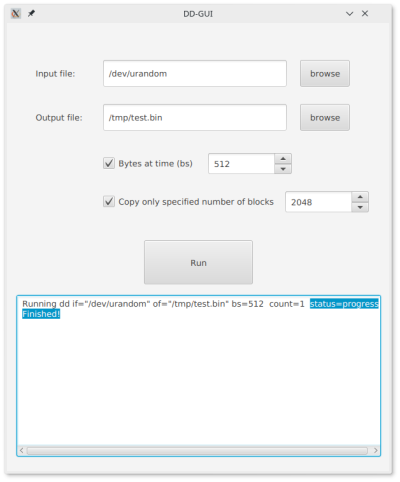
Today, I add my first LGT project. It's DD-GUI: graphical overlay for Linux console tool called dd. The dd copy data byte-by-byte. It's first version of this tool, in future i will add all functions of dd command to this tools and I will upload it.
Features
- Execute dd command
- Setup blocks size (bs)
- Setup specified number of blocks to read
- Direct output from dd in output window
Technology Stack
- Java 8
- JavaFX (FXML)
- Linux Bash Command for launching dd tool
Proof of work


Dependencies
- dd (console tool)
- gksudo or kdesu (root providers)
Installation
- Download dd-gui_Release.tar.gz from here package and untar it using following command:
tar -zxvf dd-gui_Release.tar.gz. - Make sure that you have dd. If you don't install it.
- Run install script with root. You can do it usually by using:
sudo ./install. - Gratulations! DD-GUI is installed on your computer. Now you can run it by call
dd-guior create shortcut for it.
Problems
If you have any problems with my app you can contact with me on Discord by FoxsiL#3578.
How to contribute
If you want to contribute that project you can make Pull Request or contact with me on Discord by FoxsiL#3578.
Posted on Utopian.io - Rewarding Open Source Contributors