
Function Type:
Date and Time
Description:
DAYS360 function in Excel or Google Sheets is used to compute the number of days between 2 dates on a 360 days per year scale.
This accounts for 12 months with 30 days for each
12months x 30days = 360
This is equivalent to subtracting an End Date and a Start Date, but counting every month as 30 days.
Function Structure:
=DAYS(start_date,end_date,[method])
Arguments
start_date - this is the date or serial number representing a the start date
end_date - this is the date or serial number representing a the end date
[method] - logical value (boolean) accepting TRUE or FALSE. It can also be omitted to mean FALSE.
USA method - FALSE or [omitted]
Europe method - TRUE
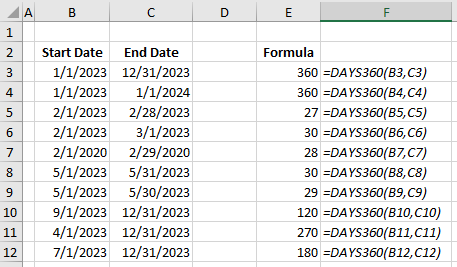
Examples
Still need help with Excel and Google Sheets?
Get Instant Expert Help in Fiverr or PeoplePerHour platforms. Click one icon below.
We can also accept LEO, HIVE, HBD tokens as payment if we transact directly here in HIVE network.
This post is designated as a reviewer for Excel trainings I conduct.
Feel free to share with anyone. 😉
Earnings from Upvotes on this post are used to continue sharing Excel knowledge.
If you also want to earn HIVE in 7 days while blogging your favorite topics, join us here at Peakd.